$ IMSAI 8080 Emulator
A Rust emulator for the IMSAI 8080, the 1975 S-100 bus computer made famous in the movie WarGames. Emulates the Intel 8080 CPU, 64KB RAM, Tarbell FD1771 floppy disk controller, and IMSAI SIO-2 dual serial board with 8251A UARTs. Two front ends: a raylib interactive front panel GUI with toggle switches, LEDs, and a live hex memory editor, and a CLI terminal mode.
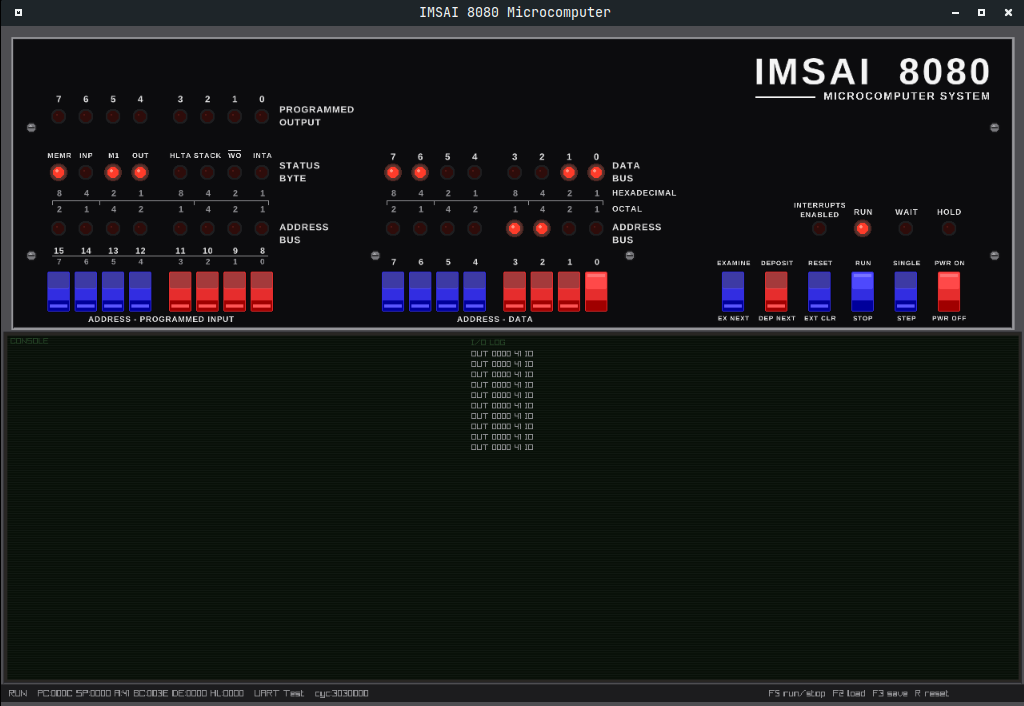
### hardware emulated
- - Intel 8080 CPU - Full instruction set emulation (opcode table, programmer's manual)
- - 64KB RAM - Initialized to 0xFF on power-up (floating bus)
- - Tarbell 1011 FDC - WD FD1771, 8" SSSD format (ports 0x48-0x4B)
- - IMSAI SIO-2 - Dual 8251A UART serial board (ports 0x00-0x03)
- - Video Display - 80x24 CRT terminal (Channel A UART output)
- - S-100 Bus - Port-mapped I/O dispatch to inline cards (no dynamic dispatch)
- - Front Panel - Toggle switches, LEDs, EXAMINE/DEPOSIT/RUN/STOP
### hardware reference
memory map
The full 64K address space is RAM. There is no ROM, no BIOS, no firmware. Memory initializes to 0xFF (floating bus). Programs should not assume memory is zeroed.
| Address Range | Contents |
|---|---|
0x0000-0xFFFF | 64K RAM (0xFF on power-up) |
i/o port map
Unclaimed ports return 0xFF on read and ignore writes.
| Port(s) | Card | Register |
|---|---|---|
0x00 | SIO-2 | Channel A data (console in/out) |
0x01 | SIO-2 | Channel A status/command |
0x02 | SIO-2 | Channel B data |
0x03 | SIO-2 | Channel B command/status |
0x48 | Tarbell | FD1771 status (read) / command (write) |
0x49 | Tarbell | FD1771 track register |
0x4A | Tarbell | FD1771 sector register |
0x4B | Tarbell | FD1771 data register |
0x79 | SIO-2 | Channel A status alias |
0x7B | SIO-2 | Channel A data alias |
0xF8-0xFB | Tarbell | FD1771 register aliases |
0xFC | Tarbell | DRQ/wait status (bit 7) |
0xFD | Tarbell | Fixed 0x00 |
0xFF | Tarbell | Fixed 0x03 |
console uart (intel 8251a)
The console is an Intel 8251A UART at ports 0x00 and 0x01. It must be
initialized before use.
TxRDY is bit 0 (0x01), not bit 1.
Using ANI 0x02 when you mean
ANI 0x01 checks the wrong flag and
hangs.
port 0x01 status bits
| Bit | Value | Meaning |
|---|---|---|
| 0 | 0x01 | TxRDY - transmitter ready |
| 1 | 0x02 | RxRDY - character available to read |
initialization sequence
MVI A, 0x4E    ; mode: 8N1, 16x baud
OUT  0x01      ;
MVI A, 0x05    ; command: enable TX and RX
OUT  0x01      ;
video display (80x24 crt terminal)
Characters written to UART Channel A (OUT port 0x00) appear on the video display. The display is an 80-column by 24-row CRT terminal — it is the output side of the console UART, not a separate I/O device.
| Feature | Value |
|---|---|
| Columns | 80 |
| Rows | 24 |
| Input | Channel A TX output (port 0x00 writes) |
| Control characters | CR (0x0D), LF (0x0A), BS (0x08) |
| Scrolling | Automatic when cursor passes the last row |
floppy controller (wd fd1771)
The Tarbell 1011 board wraps the FD1771 at ports 0x48-0x4B (aliases at 0xF8-0xFB). Disk format: 8" SSSD, 77 tracks, 26 sectors/track, 128 bytes/sector. Sectors numbered 1-26. Tracks 0-1 reserved for system.
| Offset | Read | Write |
|---|---|---|
+0 (0x48) | Status | Command |
+1 (0x49) | Track register | Track register |
+2 (0x4A) | Sector register | Sector register |
+3 (0x4B) | Data register | Data register |
front panel
The front panel is not on the I/O bus. It directly accesses the address bus, data bus, and CPU control lines. It works even with no software loaded.
status leds
| LED | Meaning |
|---|---|
| ADDRESS (16) | Current address bus value |
| DATA (8) | Current data bus value |
| PROG OUT (8) | Latched from data bus on every OUT instruction (active-low on real hardware, inverted in emulator: 1 = LED on) |
| RUN | CPU is executing |
| WAIT | CPU in wait state |
| M1 | Instruction fetch cycle |
| HLTA | CPU halted (HLT instruction) |
| INT | Interrupt pending |
| HLDA | Hold acknowledge |
| MEMR | Memory read active |
| WO | Write-output (lit when NOT writing) |
| IOR | I/O read active |
| IOW | I/O write active |
| POWER | System powered on |
### downloads
Pre-built binaries from the
latest release. Each archive contains both
imsai-cli (terminal) and
imsai-gui (front panel).
### building from source
ubuntu/debian
sudo apt install libraylib-dev arch linux
sudo pacman -S raylib macos
brew install raylib ### running
From a release binary, just extract and run. From source, use
cargo.
front panel gui (binary)
./imsai-gui terminal mode (binary)
./imsai-cli --program programs/hello-world.json front panel gui (source)
cargo run --bin imsai-gui terminal mode (source)
cargo run --bin imsai-cli -- --program programs/hello-world.json ### controls
Mouse on switches - Toggle address/data bits RUN/STOP or F5 - Start/stop CPU STEP - Single instruction EXAMINE / DEPOSIT - Read/write memory at address switches F2 - Load program (.json picker) F3 - Save memory to file F4 - Mount disk image into drive A (.img/.dsk picker) F6 - Toggle CONSOLE / live memory editor (read-only while running) Ctrl+Enter - Run from cursor address in memory editor R - Cold reset (when stopped) Ctrl+K - Command mode (CLI: load, mount, reset, quit) Ctrl+D - Exit (CLI)